Facebook Widgets and Pixels

Melody Jaimon • August 7, 2025

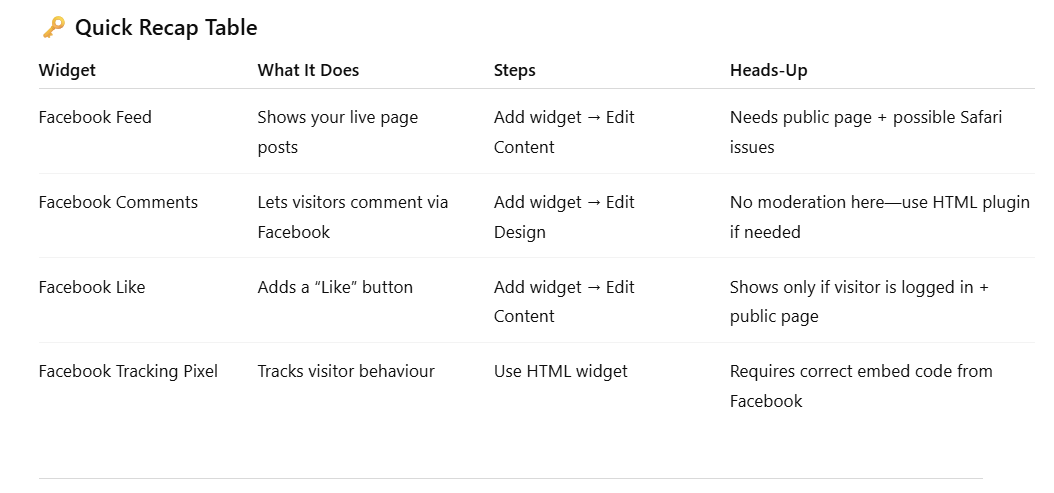
Whether you want to show your latest posts, let people drop a comment, add a Like button, or track visitors with a Facebook Pixel, this guide's for you. We’ve broken it down into super simple steps. Even if you’ve never added a widget in your life, you’ll be able to follow along without the tech headache.


Let’s walk through four handy tools that let you bring in your Facebook feed, let people comment, show a like button, or even track who's visiting your site.


1. Facebook Feed Widget


Show your visitors a live feed from your Facebook page—great for displaying updates or community moments.

  • Pop it in: Drag in the Facebook Feed widget.
  • Set it up: Right-click → Edit Content. Add your Facebook page ID (not a group, and your page must be public).
  • Style it: Right-click → Edit Design to tweak layout and spacing.


Heads up:

If your page is restricted (age, location, login required), it won’t show. Also, it might not display in Safari on iPhones due to browser restrictions. Your visitors must be logged into Facebook for it to show.


2. Facebook Comments Widget


Let visitors leave comments using their Facebook account.

  • Add it from the widget list.
  • To style: Right-click → Edit Design. Choose a light or dark theme.


Heads up:

You can’t moderate comments here. If you need moderation, use the Comments Plugin via the HTML widget.


3. Facebook Like Button


Handy for letting visitors show love with a like button that links back to your Facebook page.

  • Add it as a widget.
  • Edit it: Right-click → Edit Content. Add your page URL.
  • Style: Right-click → Edit Design as usual.


Heads up:

Only shows up for visitors who are logged into Facebook, and your page must be public.


4. Facebook Tracking Pixel


This is a tool that helps track who’s visiting your site—handy for ads or knowing who’s browsing.


Here's a Sample Pixel Code (You’ll Need Your Own Facebook ID)

Script

<!-- Facebook Pixel Code --> <script>

!function(f,b,e,v,n,t,s)

{if(f.fbq)return;n=f.fbq=function(){n.callMethod?

n.callMethod.apply(n,arguments):n.queue.push(arguments)};

if(!f._fbq)f._fbq=n;n.push=n;n.loaded=!0;n.version='2.0';

n.queue=[];t=b.createElement(e);

t.async=!0;t.src=v;s=b.getElementsByTagName(e)[0];

s.parentNode.insertBefore(t,s)}

(window, document,'script',

'https://connect.facebook.net/en_US/fbevents.js');

fbq('init', 'XXXXXXXXXXXXXXX');fbq('track', 'PageView');

</script>

NoScript

<noscript>

<img height="1" width="1" style="display:none" 

src="https://www.facebook.com/tr?id=XXXXXXXXXXXXXXX&amp;ev=PageView&amp;noscript=1"/>

</noscript>

<!-- End Facebook Pixel Code -->

How to Add It to Your Site


  1. Go to your Site Settings — the left-hand menu.
  2. Click ‘Settings’, then open the ‘Head HTML’ or Body-end HTML section.
  3. Paste the <script> part of the code into the body-end HTML area.
  4. Also paste the <noscript> part right below it.
  5. Hit Save and you're good to go.


Tip: Facebook suggests putting the noscript section near the start of the body—this helps track users who might be using older browsers.


A Couple of Important Things


  • Make sure you're using your real Facebook Pixel ID, not "YOUR_PIXEL_ID_HERE".
  • Avoid embedding this in your header if you’re using a consent management app, as it may bypass your user consent workflows.
  • The platform has tested this layout and using the Body-end section works best for performance and reliability.


Once it’s in, the pixel tracks page views instantly. If you plan to use this for ads tracking or retargeting, it's a smart first step.


A table labeled

See How Our Agency Can Drive Massive Amounts of Traffic to Your Website

Website Design designed for your audience and to be found on Google Searches
SEO - unlock relevant and increased SEO traffic. 

Paid Media - effective paid strategies with a clear ROI.

Get Started

Love My Online Marketing has 10+ Years of working alongside businesses and helping them grow. Discuss your options for online success from website Design and Development through to Google Marketing.

Get in Touch

Do you want more traffic and business leads?

Love My Online Marketing is determined to make a business grow. Our only question is, will it be yours?

Let's Chat
A shopping cart icon over a map of Australia against a blue and green gradient background.
By Melody Jaimon March 26, 2026
Scaling a Shopify store in Australia takes more than plug-ins. Custom apps improve speed, fix logistics, and support real growth.
Digital graphic of a storefront with icons representing Local SEO, floating above a laptop while a person holds a stylus.
By Melody Jaimon March 25, 2026
Learn why posting on Google Business Profile 2–3 times a week can help keep your profile active, support stronger local visibility, what types of posts to use, how the Learn more button drives website traffic, and how to schedule posts in advance.
A glowing orange hexagonal FAQ button centered among several blue hexagonal question mark icons on a dark background.
By Melody Jaimon March 25, 2026
Learn how to use FAQs to improve SEO and AEO visibility with practical, DIY-friendly tips for business owners, including where to place FAQs, how to write them, and what to avoid.
Hands typing on a laptop keyboard; focus on hands and keys.
By Melody Jaimon March 20, 2026
Most DIY sites can’t meet NDIS needs. Poor accessibility, weak SEO, and missed legal content create real risk. Read the full post.
Man in denim shirt, at a table with laptop, indoors, looking at screen, hand to chin, coffee cup nearby.
By Melody Jaimon March 13, 2026
Many NDIS providers lose trust online before anyone picks up the phone. See if your site is helping or hurting. Read the blog to find out.
Person using digital technology, blue interface, data protection, security.
By Melody Jaimon March 10, 2026
We live in an era of never-ending news about artificial intelligence and its impact on society. Read more about the real statistics and trends shaping AI.
Woman sitting at a desk, focused on a computer screen, in a dimly lit office.
By Melody Jaimon March 6, 2026
You're either teaching your designer the NDIS—or benefiting from someone who already knows it. Read this before you hire a web designer for your NDIS website.
Person using a smartphone and laptop at a desk with a calculator and other items.
March 5, 2026
Strong trust signals help shoppers feel confident buying online. See what every ecommerce product page needs to build credibility and increase sales.
Man with glasses writing in notebook at desk with computer and coffee.
By Melody Jaimon February 27, 2026
Most web designers can make a site look good — few know the NDIS. Here's how to choose someone who truly gets it. Read the blog for what to ask.
Person using a laptop with digital SEO icons overlayed.
By Melody Jaimon February 20, 2026
Visibility drives enquiries for NDIS providers. This guide explains how SEO foundations and smart website design create steady growth.